
How to Install Red Light Kodi Addon (Premium FEN Light Clone)
The Red Light Kodi addon is a brand-new, ultra-fast video addon that has taken the streaming community by storm. Built as a clone of the highly popular FEN Light, Red Light steps in as a premium, lightweight powerhouse designed to deliver high-quality links with zero bloat.
If you are looking for a reliable replacement for your older setup, Red Light is an incredible option. However, there is a catch: Red Light is a Premium Debrid-only addon and requires an external scraper module to fetch links.
In this complete guide, we will walk you through exactly how to install the Red Light addon on Kodi, set up its external scrapers, and integrate your favorite Debrid services like Real-Debrid, Premiumize, or TorBox.
Red Light Kodi Addon: Key Details & Repository Info
Before we begin, here are the official details you will need for the manual setup:
- Repository Name: The Red Repo (Red Wizard Repo)
- Source URL:
https://repo.redwizard.xyz - External Scraper Needed: Gears Scrapers
- Compatibility: Kodi 21 Omega & Kodi 20 Nexus
- Stream Requirements: Real-Debrid, Premiumize, TorBox, or AllDebrid
Important Security Warning: Red Light is a third-party Kodi addon hosted in an unverified repository. To protect your streaming data, digital fingerprint, and privacy from your ISP and malicious tracking, always use a reliable VPN like IPVanish while streaming on Kodi.
How to Install Red Light Kodi Addon (Step-by-Step)
Because Red Light is a third-party addon, you must first enable Unknown Sources in your Kodi settings before proceeding.
Step 1: Add the Red Wizard Repo Source
- Launch Kodi and click on the Settings (Gear Icon) at the top left.
- Select System > hover over Add-ons and toggle Unknown Sources to ON. Click Yes when the warning appears.
- Go back to the main Settings screen and open File Manager.
- Click Add source, then click
<None>. - Type the following URL exactly as shown:
https://repo.redwizard.xyzand click OK. - Name the source repo (or any name you prefer) and click OK again to save it.
Step 2: Install The Red Repo
- Return to the Kodi home screen and select Add-ons from the left menu.
- Click the Add-on Browser Icon (Open Box) in the top-left corner.
- Select Install from zip file.
- Click on repo (the source you saved earlier).
- Click the file named
repository.redwizard.zip. - Wait a few seconds for the notification saying “Red Repo Add-on installed” to pop up.
Step 3: Install the Red Light Addon
- On the same screen, click Install from repository.
- Select The Red Repo.
- Choose Video add-ons.
- Scroll down, locate Red Light, and click it.
- Click Install at the bottom right. Click OK to accept any required dependencies.
- Wait for the “Red Add-on installed” confirmation message
Step 4: Install the Gears Scrapers
- From the same Red Repo screen, press back once and select Program add-ons.
- Select Gears Scrapers: External Module.
- Find Gears Scrapers in the program list and click on it.
- Install the Scrapers:Finalize Dependency.
- Click Install and wait for the “Gears Scrapers installed” notification to appear.
Step 4: Set the Gears Scrapers as External Scraper
- You can go back and open the Red Light Addon
- Once opened, select Tools from the bottom of the list
- Find Settings and click on it
- From the new menu select from the left column Sources Account
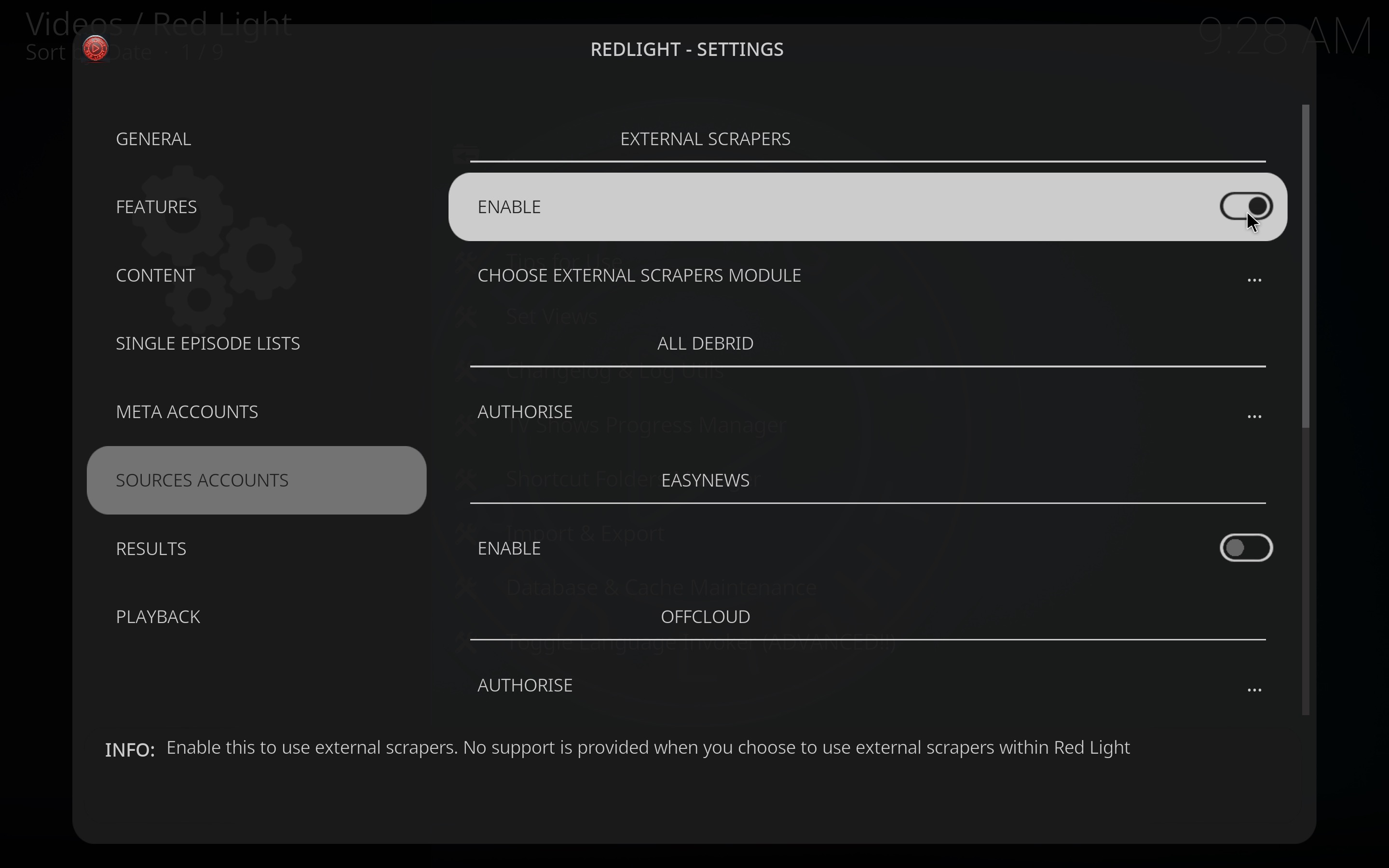
- On the right toggle to enable External Scrapers
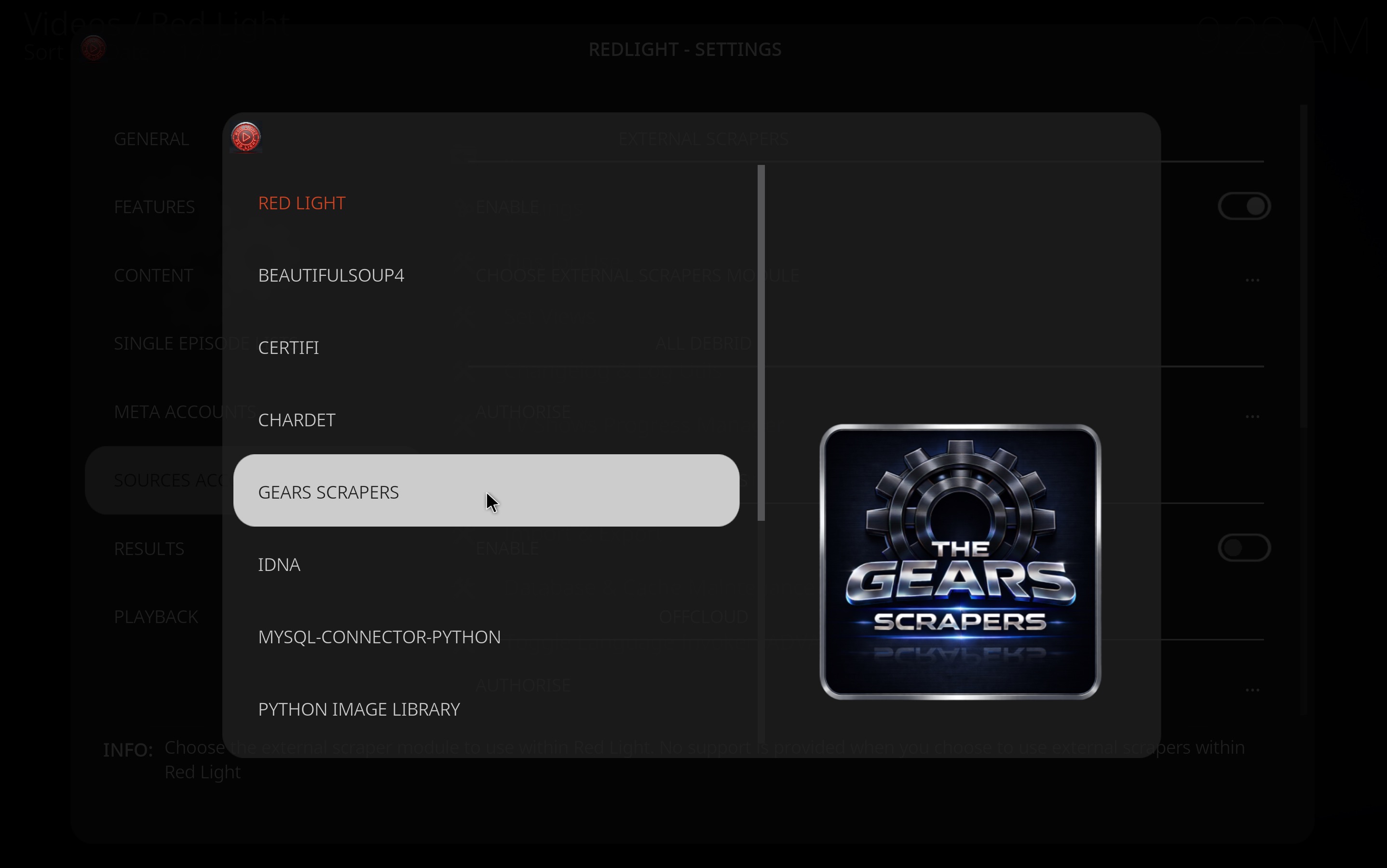
- And just below it Choose External Scrapers Module
- Select Gears Scrapers from the list and wait for the notification “Gears scrapers set as External Scraper“
Step 5: Authorize Debrid Services
Once installed, Red Light will launch, but it will not find links until you link your external scraper module and activate a premium Debrid account.
- While still in the settings menu, scroll down to your preferred Debrid service (e.g., Real-Debrid, TorBox, or Premiumize). In this example we will enable Real Debrid as it is my preferred service. This is a premium service, click here in order to get one.
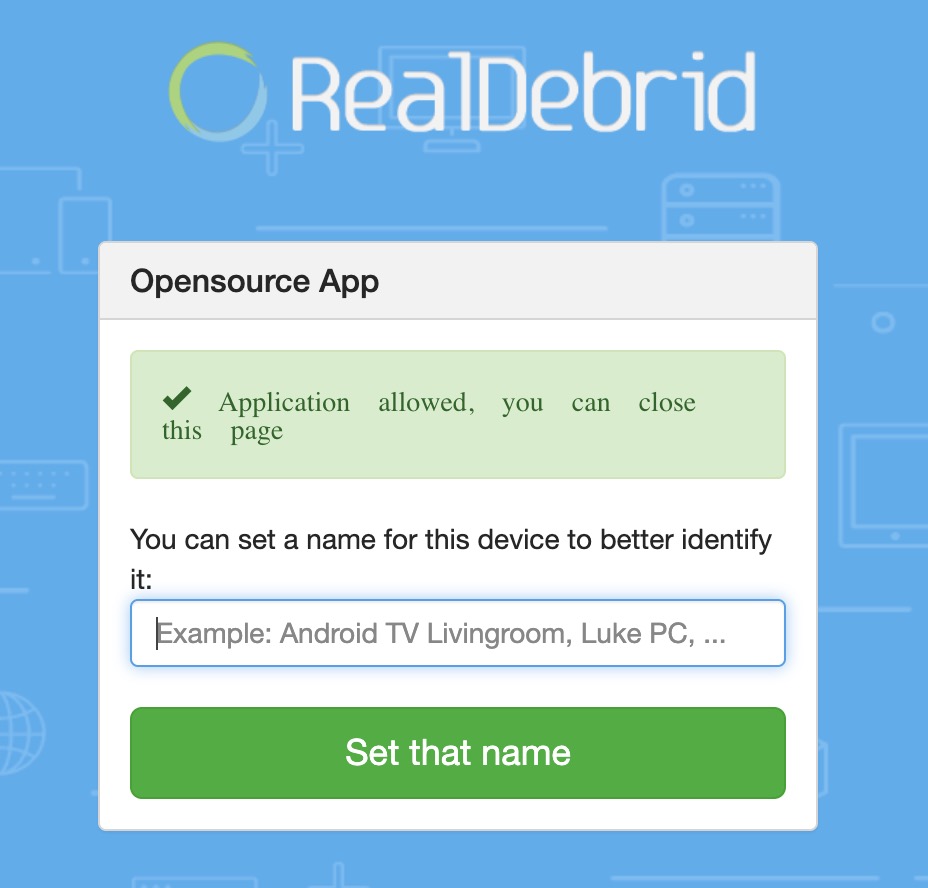
- Click Authorize and enter the unique pairing code provided on your screen into your provider’s website (e.g.,
https://tinyurl.com/XyZ123) or scan the QR Code but make sure to be on the same wifi connection as your KODI device. - You will be asked to login and then to click on the green button or OK
- Wait until you see the Success confirmation message.
Boom Shakalaka baby! Now you are ready to use the Red Light Addon on KODI!
Red Light Kodi Addon Review: Pros & Cons
| What I Like (Pros) | What I Don’t Like (Cons) |
| Ultra Fast UI: Lightning-fast FEN Light layout | Debrid Only: Absolutely no free links available |
| Gears Scrapers: Highly efficient stream scraping | Extra Setup: Requires manually installing external scrapers |
| Comprehensive Sections: Movies, TV Shows, Anime, & Trakt | Repository Warnings: Flagged by minor URL virus scans |
Frequently Asked Questions (FAQs)
Why is the Red Light addon not finding any links?
Red Light relies strictly on external scrapers. If it’s not pulling links, go to Tools > Settings > Sources Accounts, make sure External Scraper is enabled, and verify that Gears Scrapers is selected. Also, ensure your Real-Debrid or TorBox subscription hasn’t expired.
Is the Red Light addon legal?
Red Light is a third-party addon that scrapes public peer-to-peer and cyberlocker directories. Because it operates through unverified sources, we cannot verify its licensing agreements. To stay completely safe, stream content that is within the public domain or use a secure premium VPN like IPVanish.


Leave a Reply
Want to join the discussion?Feel free to contribute!