
https://i.ytimg.com/vi/V1IbKebE5Ew/hqdefault.jpg


WOW! The Gaia addon on KODI is by far the best addon I have ever seen on KODI! It is an amazing work and especially if you link it and customize it correctly it can give you the most amazing results on KODI. Movies on 4K UHD definition, TV Shows in 1080p Full HD quality, everything with Dolby Digital Sound and overall amazing video quality.

Gaia is the re-branded work of the Bubbles addon by a new developer team and has also some new additions that make it the best addon on KODI at least until now in 2018 that I have ever had the pleasure to review. Simply amazing!

In this tutorial I will show you also how to customize it and what results you should expect when using a premium service like Real Debrid or Premiumize with the Gaia add-on on KODI. I was totally impressed by the amazing results by using Usenet, Torrent and premium servers on secure connection.

For More: https://goo.gl/dbo6IL

The Dimitrology Channel is all about “FREE TV ,FREE MOVIES FREE, LIVE SPORTS” This channel is to show you KODI XBMC IPTV ADDONS, KODI TUTORIALS and GUIDES.
Top Media Streaming & Kodi tutorials, Tech Product, Device & App Reviews including: easy setup, step by step install, Kodi 17.6 Krypton, spmc, xbmc, for Android, Amazon Fire TV Stick & Windows! Easiest method tutorials, clear and precise, app/apk and device reviews and installations, on your android box, fire stick, nvidia shield & smart tv , kodi news , updates and free giveaways.
I am a reviewer, meaning that I am not affiliated with and do not sell IPTV, kodi add-ons, streaming apk or tv boxes.

Recommended TV Boxes: http://wp.me/p6WCol-mz

Recommended Remotes: http://bit.ly/2akQuTR

Best Value/Money Gamepad: http://bit.ly/2a0scxA

My recommendations for 100% secure VPN are:
IP Vanish http://bit.ly/1PowS0r
Private Internet Access http://bit.ly/2a2H5gW
Cybersilent VPN: https://goo.gl/LqK4oG

Kodi is a registered trademark of the XBMC Foundation. This content is not connected to or in any other way affiliated with Kodi, Team Kodi, or the XBMC Foundation. Furthermore, any software, addons, or products shown/offered by this content will receive no support in official Kodi channels, including the Kodi forums and various social networks. The Gaia addon on KODI is a 3rd party addon that has nothing to do with KODI.tv or the KODI official Repository.

https://i.ytimg.com/vi/BXtB1G-pDk0/hqdefault.jpg


With so many addons scraping for movies coming from Genesis, Exodus which is the best Covenant Fork on KODI 2018? There are so many Covenant Forks that I get so many questions one which one you should use.

At the beginning there was Genesis on KODI, then it came Exodus. After Exodus we had Covenant and now we have so many Forks of it the 3rd party KODI users get so confused. I kept out the Exodus Forks like Elysium, Neptune Rising, etc which work great in my opinion.

I took under consideration the following addons on KODI: Placenta, Incursion, Cerebro Showbox, Fantastic, Genesis Reborn. All Exodus / Covenant forks. Specto by MrKnow is no longer updated.

Note that if you use Real Debrid or any Debrid service for that matter, any of them will work almost perfectly. The choice was hard and based on the usage most of you do, that is without any premium services.

Of course it is a personal opinion and have nothing but respect and appreciation to any of the developers involved with these addons. They create addons that share with users with nothing in return. So I am grateful to every single one of them and let’s not forget the people before them as well.

For More: https://goo.gl/dbo6IL

The Dimitrology Channel is all about “FREE TV ,FREE MOVIES FREE, LIVE SPORTS” This channel is to show you KODI XBMC IPTV ADDONS, KODI TUTORIALS and GUIDES.
Top Media Streaming & Kodi tutorials, Tech Product, Device & App Reviews including: easy setup, step by step install, Kodi 17.4 Krypton, spmc, xbmc, for Android, Amazon Fire TV Stick & Windows! Easiest method tutorials, clear and precise, app/apk and device reviews and installations, on your android box, fire stick, nvidia shield & smart tv , kodi news , updates and free giveaways.
I am a reviewer, meaning that I am not affiliated with and do not sell IPTV, kodi add-ons, streaming apk or tv boxes.

Recommended TV Boxes: http://wp.me/p6WCol-mz

Recommended Remotes: http://bit.ly/2akQuTR

Best Value/Money Gamepad: http://bit.ly/2a0scxA

My recommendations for 100% secure VPN are:
IP Vanish http://bit.ly/1PowS0r
Private Internet Access http://bit.ly/2a2H5gW
Cybersilent VPN: https://goo.gl/LqK4oG

Best add-ons for KODI / SPMC / XBMC: https://goo.gl/9EFAck
Best of KODI Krypton 17 Video Tutorials: https://goo.gl/FQeHpQ
Android devices & apks: https://goo.gl/XIj6xA
The best Gadget reviews: https://goo.gl/I098mw

Contact Me:
Twitter – https://twitter.com/dimitrology
Facebook – https://www.facebook.com/dimitrology/
Instagram – https://www.instagram.com/dimitrology/
Reddit – https://www.reddit.com/r/dimitrology/
Email – [email protected]
Website – https://www.dimitrology.com
Forum – https://dimitrology.com/forum

Kodi is a registered trademark of the XBMC Foundation. This content is not connected to or in any other way affiliated with Kodi, Team Kodi, or the XBMC Foundation. Furthermore, any software, addons, or products shown/offered by this content will receive no support in official Kodi channels, including the Kodi forums and various social networks.
I started making a review of a new tablet and ended up making one for the most addictive casual game on Android for 2018. I got so into this game when started playing it that I decided to do also this video, as I find it very, very addicting.

It’s called Bottle Flip and even if there are more versions available, the one from Ketchapp seems the best to me.

Do you like it? Let me know down below in the comment section if you got also the same addiction with this android game as well or if you have other games that you just can’t stop playing.

For More: https://goo.gl/dbo6IL

The Dimitrology Channel is all about “FREE TV ,FREE MOVIES FREE, LIVE SPORTS” This channel is to show you KODI XBMC IPTV ADDONS, KODI TUTORIALS and GUIDES.
Top Media Streaming & Kodi tutorials, Tech Product, Device & App Reviews including: easy setup, step by step install, Kodi 17.4 Krypton, spmc, xbmc, for Android, Amazon Fire TV Stick & Windows! Easiest method tutorials, clear and precise, app/apk and device reviews and installations, on your android box, fire stick, nvidia shield & smart tv , kodi news , updates and free giveaways.
I am a reviewer, meaning that I am not affiliated with and do not sell IPTV, kodi add-ons, streaming apk or tv boxes.

Recommended TV Boxes: http://wp.me/p6WCol-mz

Recommended Remotes: http://bit.ly/2akQuTR

Best Value/Money Gamepad: http://bit.ly/2a0scxA

My recommendations for 100% secure VPN are:
IP Vanish http://bit.ly/1PowS0r
Private Internet Access http://bit.ly/2a2H5gW
Cybersilent VPN: https://goo.gl/LqK4oG

Best add-ons for KODI / SPMC / XBMC: https://goo.gl/9EFAck
Best of KODI Krypton 17 Video Tutorials: https://goo.gl/FQeHpQ
Android devices & apks: https://goo.gl/XIj6xA
The best Gadget reviews: https://goo.gl/I098mw

Contact Me:
Twitter – https://twitter.com/dimitrology
Facebook – https://www.facebook.com/dimitrology/
Instagram – https://www.instagram.com/dimitrology/
Reddit – https://www.reddit.com/r/dimitrology/
Email – [email protected]
Website – https://www.dimitrology.com
Forum – https://dimitrology.com/forum

Kodi is a registered trademark of the XBMC Foundation. This content is not connected to or in any other way affiliated with Kodi, Team Kodi, or the XBMC Foundation. Furthermore, any software, addons, or products shown/offered by this content will receive no support in official Kodi channels, including the Kodi forums and various social networks.

BOTTLE FLIPS IS THE MOST ADDICTING CASUAL GAME ON ANDROID 2018

https://i.ytimg.com/vi/TTVa3w5WEaM/hqdefault.jpg


Now with the Aptoide KODI Addon you can install on any Android device, including Amazon FireTV Stick (aka Firestick), NVIDIA SHIELD TV, XIAOMI MI TV BOX (Android TV) and any Android device like Android TV Box, Smartphone, Tablet any APK from the Aptoide App Store.

This amazing addon is very useful for any Firestick user, NVIDIA Shield user but also for easiness to any Android device user. You do not need to search for websites and URL anymore, simply launch the Aptoide KODI addon that will do everything from you, from inside KODI!

The Aptoide KODI Addon is created by Aenemapy, a new and very talented developer.

For More: https://goo.gl/dbo6IL

The Dimitrology Channel is all about “FREE TV ,FREE MOVIES FREE, LIVE SPORTS” This channel is to show you KODI XBMC IPTV ADDONS, KODI TUTORIALS and GUIDES.
Top Media Streaming & Kodi tutorials, Tech Product, Device & App Reviews including: easy setup, step by step install, Kodi 17.6 Krypton, spmc, xbmc, for Android, Amazon Fire TV Stick & Windows! Easiest method tutorials, clear and precise, app/apk and device reviews and installations, on your android box, fire stick, nvidia shield tv & smart tv, kodi news, Aptoide, updates and free giveaways.
I am a reviewer, meaning that I am not affiliated with and do not sell IPTV, kodi add-ons, streaming apk or tv boxes.

Recommended TV Boxes: http://wp.me/p6WCol-mz

Recommended Remotes: http://bit.ly/2akQuTR

Best Value/Money Gamepad: http://bit.ly/2a0scxA

My recommendations for 100% secure VPN are:
IP Vanish http://bit.ly/1PowS0r
Private Internet Access http://bit.ly/2a2H5gW
Cybersilent VPN: https://goo.gl/LqK4oG

Best add-ons for KODI / SPMC / XBMC: https://goo.gl/9EFAck
Best of KODI Krypton 17 Video Tutorials: https://goo.gl/FQeHpQ
Android devices & apks: https://goo.gl/XIj6xA
The best Gadget reviews: https://goo.gl/I098mw

Contact Me:
Twitter – https://twitter.com/dimitrology
Facebook – https://www.facebook.com/dimitrology/
Instagram – https://www.instagram.com/dimitrology/
Reddit – https://www.reddit.com/r/dimitrology/
Email – [email protected]
Website – https://www.dimitrology.com
Forum – https://dimitrology.com/forum

Kodi is a registered trademark of the XBMC Foundation. This content is not connected to or in any other way affiliated with Kodi, Team Kodi, or the XBMC Foundation. Furthermore, any software, addons, or products shown/offered by this content will receive no support in official Kodi channels, including the Kodi forums and various social networks.

INSTALL ANY APK ON ANY ANDROID DEVICE LIKE FIRETV STICK, TV BOX, ANDROID TV WITH THE APTOIDE KODI ADDON

https://i.ytimg.com/vi/ijhGZjaM_B8/hqdefault.jpg

Watch 4K Movies on KODI may be a real pain sometimes. There are a lot of addons, but some require to have a Debrid / Premiumize account, others are just unstable. The one I consider to be the most stable with free links and has been working great for a long time now though is the Maverick TV addon on KODI. I have tested it through time and now also on KODI 17.6 the 4K Movies inside this addon are absolutely flawless. Fast playback, easy to select and one click to play.

Do you think there is another alternative, better or even close? Leave your suggestions down below in the comments so other users can benefit as well.

4K UHD (2160p) is a resolution of 3840 pixels × 2160 lines (8.3 megapixels, aspect ratio 16:9). 4K UHD is not available on all TV Boxes, make sure that your device is compatible if you have issues with 4K UHD playback on KODI.

For More: https://goo.gl/dbo6IL

The Dimitrology Channel is all about “FREE TV ,FREE MOVIES FREE, LIVE SPORTS” This channel is to show you KODI XBMC IPTV ADDONS, KODI TUTORIALS and GUIDES.
Top Media Streaming & Kodi tutorials, 4K Movies, Tech Product, Device & App Reviews including: easy setup, step by step install, Kodi 17.6 Krypton, spmc, xbmc, for Android, Amazon Fire TV Stick & Windows! Easiest method tutorials, clear and precise, app/apk and device reviews and installations, on your android box, fire stick, nvidia shield & smart tv, kodi news, uhd film, updates and free giveaways.
I am a reviewer, meaning that I am not affiliated with and do not sell IPTV, kodi add-ons, streaming apk or tv boxes.

Recommended TV Boxes: http://wp.me/p6WCol-mz

Recommended Remotes: http://bit.ly/2akQuTR

Best Value/Money Gamepad: http://bit.ly/2a0scxA

My recommendations for 100% secure VPN are:
IP Vanish http://bit.ly/1PowS0r
Private Internet Access http://bit.ly/2a2H5gW
Cybersilent VPN: https://goo.gl/LqK4oG

Best add-ons for KODI / SPMC / XBMC: https://goo.gl/9EFAck
Best of KODI Krypton 17 Video Tutorials: https://goo.gl/FQeHpQ
Android devices & apks: https://goo.gl/XIj6xA
The best Gadget reviews: https://goo.gl/I098mw

Contact Me:
Twitter – https://twitter.com/dimitrology
Facebook – https://www.facebook.com/dimitrology/
Instagram – https://www.instagram.com/dimitrology/
Reddit – https://www.reddit.com/r/dimitrology/
Email – [email protected]
Website – https://www.dimitrology.com
Forum – https://dimitrology.com/forum

Kodi is a registered trademark of the XBMC Foundation. This content is not connected to or in any other way affiliated with Kodi, Team Kodi, or the XBMC Foundation. Furthermore, any software, addons, or products shown/offered by this content will receive no support in official Kodi channels, including the Kodi forums and various social networks.

BEST4K MOVIES ADDON ON KODI 17.6 2018

https://i.ytimg.com/vi/snwZ3D78Qtc/hqdefault.jpg


This top addon is an Exodus Fork that works great on KODI 17.6 on 2018! I suddenly realized that I reviewed a lot of Covenant / Exodus forks lately but not the one I currently use more… The Oculus addon on KODI is created by Trademark and is an Exodus or better Zen / Elysium / Poseidon fork with more features and more results. Other than the URLResolver it also uses the NAN Scraper for even more streams!

Try it yourselves and let me know in the comment section whether you like it or not. My personal opinion is that is one of the top addons on KODI 17.6 for 2018!

For More: https://goo.gl/dbo6IL

The Dimitrology Channel is all about “FREE TV ,FREE MOVIES FREE, LIVE SPORTS” This channel is to show you KODI XBMC IPTV ADDONS, KODI TUTORIALS and GUIDES.
Top Media Streaming & Kodi tutorials, Tech Product, Device & App Reviews including: easy setup, step by step install, Kodi 17.4 Krypton, spmc, xbmc, for Android, Amazon Fire TV Stick & Windows! Easiest method tutorials, clear and precise, app/apk and device reviews and installations, on your android box, fire stick, nvidia shield & smart tv , kodi news , updates and free giveaways.
I am a reviewer, meaning that I am not affiliated with and do not sell IPTV, kodi add-ons, streaming apk or tv boxes.

Recommended TV Boxes: http://wp.me/p6WCol-mz

Recommended Remotes: http://bit.ly/2akQuTR

Best Value/Money Gamepad: http://bit.ly/2a0scxA

My recommendations for 100% secure VPN are:
IP Vanish http://bit.ly/1PowS0r
Private Internet Access http://bit.ly/2a2H5gW
Cybersilent VPN: https://goo.gl/LqK4oG

Best add-ons for KODI / SPMC / XBMC: https://goo.gl/9EFAck
Best of KODI Krypton 17 Video Tutorials: https://goo.gl/FQeHpQ
Android devices & apks: https://goo.gl/XIj6xA
The best Gadget reviews: https://goo.gl/I098mw

Contact Me:
Twitter – https://twitter.com/dimitrology
Facebook – https://www.facebook.com/dimitrology/
Instagram – https://www.instagram.com/dimitrology/
Reddit – https://www.reddit.com/r/dimitrology/
Email – [email protected]
Website – https://www.dimitrology.com
Forum – https://dimitrology.com/forum

Kodi is a registered trademark of the XBMC Foundation. This content is not connected to or in any other way affiliated with Kodi, Team Kodi, or the XBMC Foundation. Furthermore, any software, addons, or products shown/offered by this content will receive no support in official Kodi channels, including the Kodi forums and various social networks.

https://i.ytimg.com/vi/WcE7YYFTpZw/hqdefault.jpg


These 2 addons are the best two KODI addons 2018 for free Live TV / IPTV and Movies, TV Shows right now! The Cerebro KODI addons or better the Cerebro IPTV addon and the Cerebro Showbox addon for KODI are a very impressive work, for live tv, freeview tv, movies and tv shows.

The Cerebro IPTV brings Mobdro and PakIndia Sports Live TV, the Cerebro Showbox is an Exodus / Covenant fork with great streams and new features.

You can get the Cerebro addons for KODI from the Cerebro TV Repo (CerebroTV Repo).

For More: https://goo.gl/dbo6IL

The Dimitrology Channel is all about “FREE TV ,FREE MOVIES FREE, LIVE SPORTS” This channel is to show you KODI XBMC IPTV ADDONS, KODI TUTORIALS and GUIDES.
Top Media Streaming & Kodi tutorials, Tech Product, Device & App Reviews including: easy setup, step by step install, Kodi 17.6 Krypton, spmc, xbmc, for Android, Amazon Fire TV Stick & Windows! Easiest method tutorials, clear and precise, app/apk and device reviews and installations, on your android box, fire stick, nvidia shield & smart tv , kodi news , updates and free giveaways.
I am a reviewer, meaning that I am not affiliated with and do not sell IPTV, kodi add-ons, streaming apk or tv boxes.

Recommended TV Boxes: http://wp.me/p6WCol-mz

Recommended Remotes: http://bit.ly/2akQuTR

Best Value/Money Gamepad: http://bit.ly/2a0scxA

My recommendations for 100% secure VPN are:
IP Vanish http://bit.ly/1PowS0r
Private Internet Access http://bit.ly/2a2H5gW
Cybersilent VPN: https://goo.gl/LqK4oG

Best add-ons for KODI / SPMC / XBMC: https://goo.gl/9EFAck
Best of KODI Krypton 17 Video Tutorials: https://goo.gl/FQeHpQ
Android devices & apks: https://goo.gl/XIj6xA
The best Gadget reviews: https://goo.gl/I098mw

Contact Me:
Twitter – https://twitter.com/dimitrology
Facebook – https://www.facebook.com/dimitrology/
Instagram – https://www.instagram.com/dimitrology/
Reddit – https://www.reddit.com/r/dimitrology/
Email – [email protected]
Website – https://www.dimitrology.com
Forum – https://dimitrology.com/forum

Kodi is a registered trademark of the XBMC Foundation. This content is not connected to or in any other way affiliated with Kodi, Team Kodi, or the XBMC Foundation. Furthermore, any software, addons, or products shown/offered by this content will receive no support in official Kodi channels, including the Kodi forums and various social networks.

THE BEST TWO KODI ADDONS 2018 FOR LIVE TV AND MOVIES TV SHOWS ON KODI 17.6

https://i.ytimg.com/vi/Y6mI9xeFRCo/hqdefault.jpg


Covenant addon on KODI is no longer supported by developers, who actually abandoned the addon. So it is only a matter if time that it dies but hey, there are some great alternatives to the Covenant addon on KODI on 2018 that can really deliver great amount of streams for movies and tv shows, just like Covenant and Exodus did in the past!

The Covenant forks (meaning addons that come from the original work of other people but actively developed by a new person or team) that we have right now are three:

Fantastic addon, Placenta addon and Incursion addon. I have already done a video about the Fantastic addon in the past: https://www.youtube.com/watch?v=0QVAyR2nuZU

In this video I am gonna show you how to install the Placenta and the Incursion addons.

For More: https://goo.gl/dbo6IL

The Dimitrology Channel is all about “FREE TV ,FREE MOVIES FREE, LIVE SPORTS” This channel is to show you KODI XBMC IPTV ADDONS, KODI TUTORIALS and GUIDES.
Top Media Streaming & Kodi tutorials, Tech Product, Device & App Reviews including: easy setup, step by step install, Kodi 17.4 Krypton, spmc, xbmc, for Android, Amazon Fire TV Stick & Windows! Easiest method tutorials, clear and precise, app/apk and device reviews and installations, on your android box, fire stick, nvidia shield & smart tv , kodi news , updates and free giveaways.
I am a reviewer, meaning that I am not affiliated with and do not sell IPTV, kodi add-ons, streaming apk or tv boxes.

Recommended TV Boxes: http://wp.me/p6WCol-mz

Recommended Remotes: http://bit.ly/2akQuTR

Best Value/Money Gamepad: http://bit.ly/2a0scxA

My recommendations for 100% secure VPN are:
IP Vanish http://bit.ly/1PowS0r
Private Internet Access http://bit.ly/2a2H5gW
Cybersilent VPN: https://goo.gl/LqK4oG

Best add-ons for KODI / SPMC / XBMC: https://goo.gl/9EFAck
Best of KODI Krypton 17 Video Tutorials: https://goo.gl/FQeHpQ
Android devices & apks: https://goo.gl/XIj6xA
The best Gadget reviews: https://goo.gl/I098mw

Contact Me:
Twitter – https://twitter.com/dimitrology
Facebook – https://www.facebook.com/dimitrology/
Instagram – https://www.instagram.com/dimitrology/
Reddit – https://www.reddit.com/r/dimitrology/
Email – [email protected]
Website – https://www.dimitrology.com
Forum – https://dimitrology.com/forum

Kodi is a registered trademark of the XBMC Foundation. This content is not connected to or in any other way affiliated with Kodi, Team Kodi, or the XBMC Foundation. Furthermore, any software, addons, or products shown/offered by this content will receive no support in official Kodi channels, including the Kodi forums and various social networks.

Covenant alternatives / forks on KODI 2018 review, tutorial and how to install them.

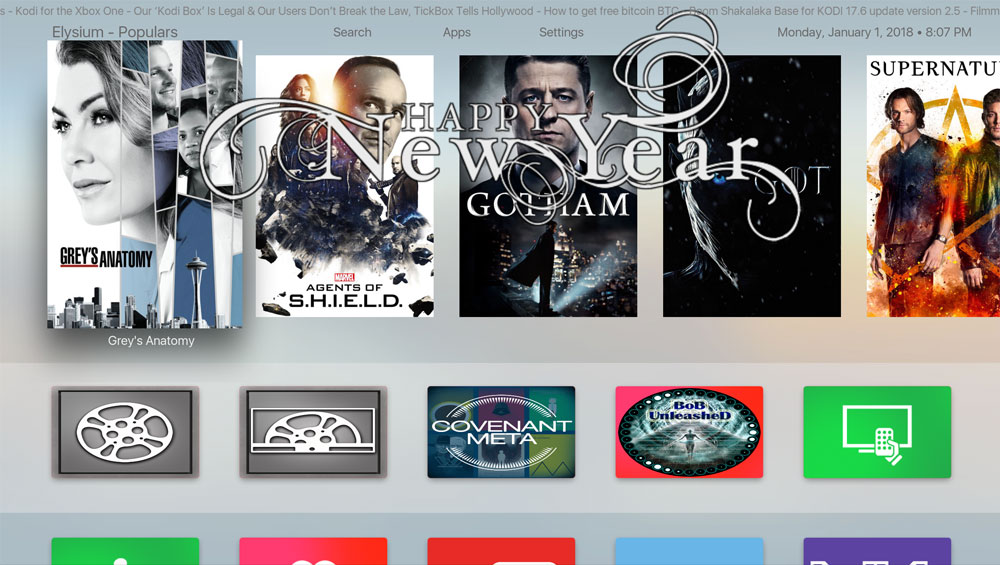
The AppleTV-like build for KODI 17.6 Serenity by Schism TV has been updated to version 2.0 and comes with all the latest addons for a full media experience. In this update we reduced the size while actually adding content and some new addons. Also some internal bug fixing and re-arrangement.

The Serenity Build for KODI 17.6 v2.0 is now 269MB as a zipped file so it is smaller than ever. It only works on KODI 17 Krypton (better if the latest version 17.6) and brings everything from movies, tv shows, sports, live tv, kids and more.

Serenity TV

The changelog of Serenity KODI Build v2.0:

– Removed Nemesis
– Removed Our Sports
– Added Judgement Media
– Added Judgement IPTV
– Updated the Covenant addon, modules and script
– Removed Specto
– Updated Planet MMA
– Added Wolfpack addon
– TVOne1 is now on the top, main bar and as widget

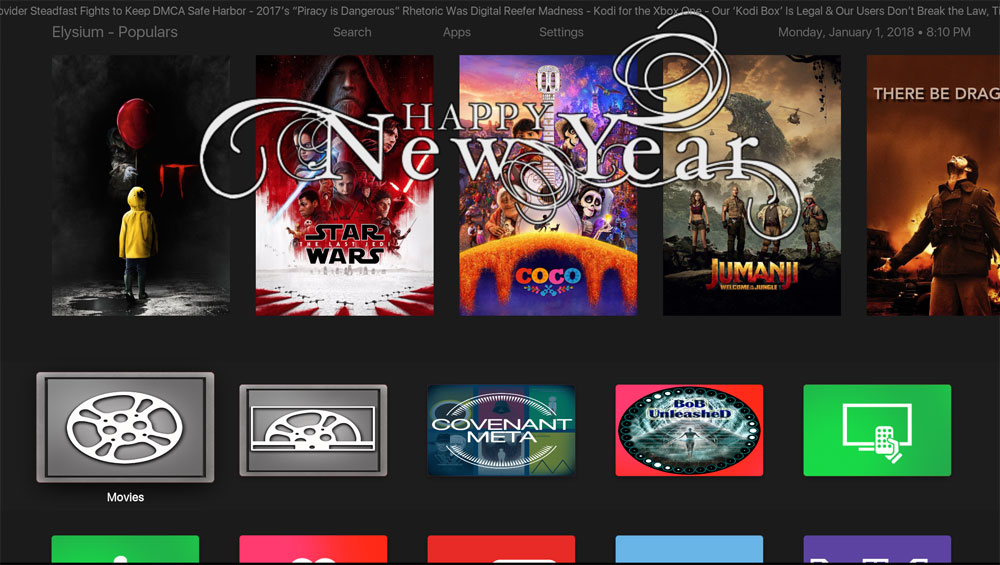
The “Happy New Year” message will only appear for today as 1st of January 2018. You do not have to do anything in order to make it go away. You can also change the theme color to Dark, as in the image below:

⇒ Please remember that we do not accept donations. The builds are 100% free. Happy streaming and happy new year!  

HOW TO INSTALL:

1. On a fresh installation of KODI (do always a Fresh Start before installing builds) go under SYSTEM and select FILE MANAGER from the submenu
2. Select ADD SOURCE
3. Click on NONE and enter https://dimitrology.com/repo and click on DONE
4. Select OK
5. Go to HOME
6. Select SYSTEM
7. Select ADDONS
8. Select INSTALL FROM ZIP
9. Click on repo from the list and select plugin.video.dimitv.zip
10. Wait for the notification that Dimitrology TV has been installed
11. Go to HOME
12. Select PROGRAMS
13. Open Dimitrology TV Wizard
14. Now select SETTINGS and enter the code which you can find at https://dimitrology.com/getcode
15. Select INSTALL
16. Select Serenity v2.0
17. Select FRESH INSTALL and wait for the installation to finish.
18. When asked to, select OK and then go to SETTINGS, INTERFACE and select the Serenity TV OSX skin. No force close is required.
19. If you do not see the thumbnails afterwards, this is perfectly normal as the wizard removes all the thumbnails. Simply exit from KODI, now open it once again and BOOM SHAKALAKA BABY!!!

https://i.ytimg.com/vi/jo3BL6oht4A/hqdefault.jpg


Two great new addons on KODI 17.6 Krypton for LIVE TV / IPTV, Movies, TV Shows, Kids and Music. The Judgement Media and Judgement IPTV are two addons that work together in order to give you all the above on KODI 17.6.

Very nice work, just a little slow inside the menu when loading the metadata for movies and tv shows. For the rest I absolutely loved them.

Let me know your thoughts down, below.

For More: https://goo.gl/dbo6IL

The Dimitrology Channel is all about “FREE TV ,FREE MOVIES FREE, LIVE SPORTS” This channel is to show you KODI XBMC IPTV ADDONS, KODI TUTORIALS and GUIDES.
Top Media Streaming & Kodi tutorials, Tech Product, Device & App Reviews including: easy setup, step by step install, Kodi 17.4 Krypton, spmc, xbmc, for Android, Amazon Fire TV Stick & Windows! Easiest method tutorials, clear and precise, app/apk and device reviews and installations, on your android box, fire stick, nvidia shield & smart tv , kodi news , updates and free giveaways.
I am a reviewer, meaning that I am not affiliated with and do not sell IPTV, kodi add-ons, streaming apk or tv boxes.

Recommended TV Boxes: http://wp.me/p6WCol-mz

Recommended Remotes: http://bit.ly/2akQuTR

Best Value/Money Gamepad: http://bit.ly/2a0scxA

My recommendations for 100% secure VPN are:
IP Vanish http://bit.ly/1PowS0r
Private Internet Access http://bit.ly/2a2H5gW
Cybersilent VPN: https://goo.gl/LqK4oG

Best add-ons for KODI / SPMC / XBMC: https://goo.gl/9EFAck
Best of KODI Krypton 17 Video Tutorials: https://goo.gl/FQeHpQ
Android devices & apks: https://goo.gl/XIj6xA
The best Gadget reviews: https://goo.gl/I098mw

Contact Me:
Twitter – https://twitter.com/dimitrology
Facebook – https://www.facebook.com/dimitrology/
Instagram – https://www.instagram.com/dimitrology/
Reddit – https://www.reddit.com/r/dimitrology/
Email – [email protected]
Website – https://www.dimitrology.com
Forum – https://dimitrology.com/forum

Kodi is a registered trademark of the XBMC Foundation. This content is not connected to or in any other way affiliated with Kodi, Team Kodi, or the XBMC Foundation. Furthermore, any software, addons, or products shown/offered by this content will receive no support in official Kodi channels, including the Kodi forums and various social networks.